A legfontosabb tudnivalók
- Deep CDR™ Technology does not require a malicious verdict to sanitize an attachment: it reconstructs supported files according to organizational policy.
- AV-Comparatives reported 100% sanitisation and retained file usability under its tested Deep CDR™ Technology configuration, adding to evaluations by SE Labs and SecureIQLab.
- Deep CDR™ Technology complements detection in MetaDefender™ for Microsoft 365 and MetaDefender™ Email Gateway Security.
For email security buyers, the goal is straightforward: remove potentially malicious and out-of-policy content from attachments while keeping business files usable. The 2026 AV-Comparatives review of Deep CDR™ Technology provides independent evidence of both outcomes. Under the tested configuration, Deep CDR™ Technology achieved a 100% sanitisation rate across the evaluated scenarios, and reconstructed files retained usability, content and structure. Here is what those findings mean for attachment security, and where Deep CDR™ Technology fits in a layered email defense.
What is Deep CDR™ Technology for email security?
Deep CDR™ Technology is OPSWAT’s prevention-first implementation of content disarm and reconstruction (CDR), built into the MetaDefender Platform. It sanitizes supported files and regenerates policy-conforming copies across 200+ file types, helping organizations reduce file-borne exposure while keeping approved business information usable.
What makes it “Deep”?
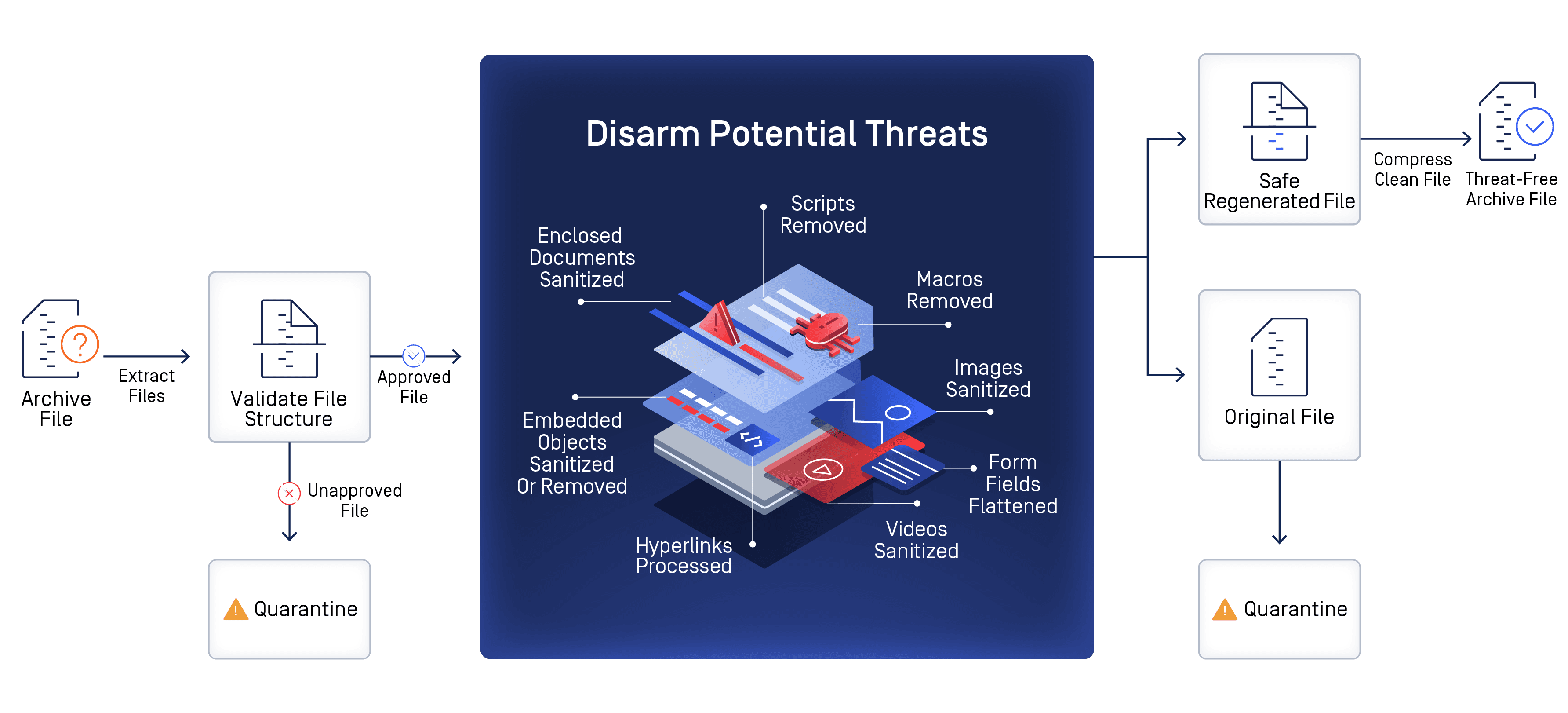
Recursive processing reaches inside supported complex files and nested archives rather than stopping at the outer container. Configurable policies determine which content is retained, removed or reconstructed. This combines depth of processing with control over the information users receive.
What does that coverage mean in practice?
These three illustrative scenarios show how file-type coverage translates into business value.
- Finance, procurement, HR and legal: Teams can exchange PDFs, Word documents (DOCX) and Excel workbooks (XLSX/XLSM) while applying a consistent sanitization policy. A supplier workbook, for example, can retain approved business data without carrying forward disallowed active content.
- Defense suppliers, manufacturing and engineering: Supported AutoCAD DWG drawings bring design information into the same sanitization workflow as PDF and Office attachments, extending coverage beyond standard productivity documents.
- Healthcare: Support for clinical documents and DICOM imaging files extends file sanitization to imaging workflows, helping reduce exposure while retaining policy-permitted clinical content.
Why Email Attachment Security Needs More Than a Malicious Verdict
Verizon’s 2026 Data Breach Investigations Report identifies phishing as the initial access vector in 16% of breaches. For email security buyers, that finding reinforces the importance of layered controls, not just filtering deceptive messages but addressing the files they may carry.
For supported attachments, that means adding policy-driven sanitization alongside message filtering. The AV-Comparatives findings provide evidence for this complementary control: Deep CDR™ Technology addresses file-borne exposure, while anti-phishing and other detection layers address different aspects of the attack.
What Does Air Gap Logic Mean for Email Attachments?
Attackers do not need to defeat every security control at once; they look for a path through the controls in front of them. Google’s Threat Intelligence Group reports that AI-assisted coding accelerates adversary development, including polymorphic malware and obfuscation used for defense evasion. It also describes malware that uses AI models to interpret system states and generate commands. These capabilities can shorten development cycles and support more adaptive attacks. They do not make every attack successful, but they strengthen the case for a prevention layer that does not require a prior malicious verdict.
That is where the air-gap analogy is useful. An air gap provides strong isolation by sharply limiting direct network connectivity; it does not confer absolute protection. Controlled transfers and removable media can still introduce files into isolated environments, so file-level controls remain necessary.
Email, supplier portals and customer-upload workflows must accommodate external files, so Deep CDR™ Technology applies an analogous trust principle at the content level: treat incoming files as untrusted and permit only policy-conforming content to proceed.
What Three Independent Labs Found for Deep CDR™ Technology
The 2026 AV-Comparatives report adds evidence on policy-driven sanitization and file usability to earlier evaluations by SE Labs and SecureIQLab.
- AV-Comparatives reported a 100% sanitisation rate across the evaluated file types and scenarios under the applied workflow configuration. It also assessed file fidelity, finding that reconstructed files retained usability, content and structure, with changes reflecting workflow policy.
- SecureIQLab recorded 100% sanitization and 100% fidelity in its 2024 validation of Deep CDR™ Technology. Its scope included threats obfuscated within nested, embedded and archived files, with fidelity assessing whether sanitized and benign files remained usable.
- SE Labs reported 100% Protection Accuracy and 100% Legitimate Accuracy in its October 2023 CDR test. The evaluation assessed targeted file-based attacks hidden in office documents, archives and miscellaneous formats, alongside legitimate-file handling. Deep CDR™ Technology was the first CDR technology to achieve a 100% protection and accuracy score from SE Labs.
The AV-Comparatives review evaluated Deep CDR™ Technology across more than 300 test cases and 50 distinct file formats in an on-premises deployment, including AI-assisted malicious content. The full report details the tested settings, scenario results and observations involving embedded content and QR-code sanitization. An overview of the report is provided in this blogpost.
For email security buyers, the practical value is reducing attachment-borne exposure while preserving the approved information people need to keep operations running.
How Does Deep CDR™ Technology Process an Email Attachment?
Deep CDR™ Technology sanitizes supported files without relying on signatures, heuristics or behavioral analysis to establish maliciousness. The policy-driven workflow comprises four stages:
- Verify file type and structural integrity. Validate the file against its official specification to help identify file-type inconsistencies and reduce file-masquerading risk.
- Remove scripts, macros, embedded objects, and other out-of-policy elements. Apply the configured sanitization policy to supported content.
- Regenerate and validate a functional, policy-conforming copy. Preserve supported layout, formatting, tables and formulas where permitted by policy, then test and validate the reconstructed file.
- Produce sanitization details. Record the elements changed and the reasons for each action to support auditability and investigation.
Original-file disposition depends on the implementing product and configured workflow.
Recursive sanitization extends processing to supported nested archives, embedded PDFs and multilayer Office documents, rather than inspecting only the outer container. Deep CDR™ Technology can also analyze QR codes in image files, extract the encoded URLs and neutralize malicious links.
Where Does Deep CDR™ Technology Fit in a Layered Email Defense?
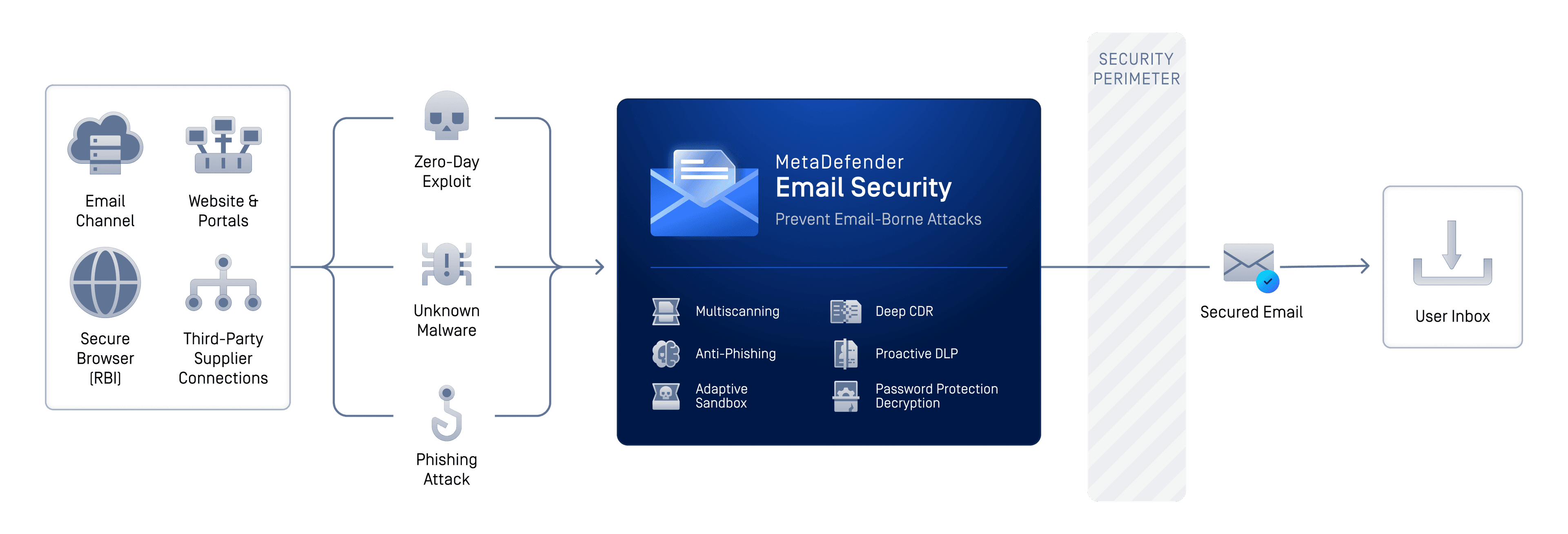
MetaDefender Email Security combines detection and prevention to help reduce email-borne threats. It combines the following technologies to give organizations utmost control on inbound and outbound communications:
- Anti-spam and anti-phishing: Message analysis, sender-authentication checks and configurable impersonation rules help identify deceptive email. Configured on-arrival and time-of-click URL checks draw on more than 30 online reputation sources.
- Metascan™ Multiscanning: Combines signature-based detection, heuristic analysis and AI-powered models by scanning files with multiple anti-malware engines in parallel. Aggregated, normalized results help teams apply policy using evidence from multiple detection technologies rather than a single verdict, which typically catches between 40% and 80% of malware.
- MetaDefender Aether™: Uses emulation-based dynamic analysis to expose suspicious execution paths and collect behavioral evidence of evasive and zero-day threats. Fast-pass analysis can return results in approximately 10 seconds.
- Deep CDR™ Technology: Verifies, disarms and regenerates supported files across 200+ file types according to policy, without requiring a prior malicious verdict. Reconstruction completes in milliseconds for supported files, while end-to-end processing depends on the file, configuration and other inspection layers.
- Proactive DLP™: It inspects email bodies, headers and supported attachments to identify sensitive data and apply configured policy. Coverage across more than 125 file types extends data controls beyond message text.
- Password-protected attachment handling: Supported password-entry and decryption workflows make encrypted attachments available for inspection and sanitization after successful decryption. Policy determines how unsupported files and decryption failures are handled, rather than treating unreadable content as cleared.
The solution contains MetaDefender for Microsoft 365 product for Microsoft cloud deployments and MetaDefender Email Gateway Security for on-premises infrastructure.
Put Your Attachment Policy to the Test
Evaluate more than the detection verdict: establish which content the workflow permits. Bring representative attachments, required business functions and your mail-flow architecture to an OPSWAT expert to assess sanitization policy, file usability and deployment fit.
Kapcsolódó témák
- How Deep CDR™ Technology Helps Prevent Steganography-Based Threats Hidden in Image Files
- Az SVG-formátumban terjesztett kártevő programok elárasztják az e-maileket. Íme, mi képes ténylegesen megakadályozni őket.
- Hogyan értékeljük Email Security 7 kérdés segítségével?
Deep CDR™ Technology Email Security FAQ
Does Deep CDR™ Technology replace antivirus or sandboxing?
No. Deep CDR™ Technology enforces content policy through sanitization; antivirus and sandboxing seek evidence of malicious content or behavior. These controls are complementary.
What does the recipient receive, and what happens to the original?
In a configured reconstruction workflow, the recipient receives a policy-conforming reconstructed copy of the supported file. Original-file disposition, including quarantine, depends on the implementing product and workflow.
Does Deep CDR™ Technology slow down email delivery?
Deep CDR™ Technology regenerates sanitized supported files in milliseconds. End-to-end processing time depends on file complexity, policy, deployment and other enabled inspection layers.
Can Deep CDR™ Technology sanitize nested archives and embedded files?
Yes, for supported formats and configured workflows. Recursive processing extends sanitization to content within the outer file. Check the supported file types before making your buying decision.
How are password-protected email attachments sanitized?
MetaDefender Email Security can retrieve a password from the email body and use it to decrypt a supported attachment, scan it for malware, sanitize it with Deep CDR™ Technology and sandbox it as needed. If no password is found, the recipient receives an email with a link to a self-service portal where they can enter it. Once the file is successfully decrypted, the same inspection process runs automatically, without manual IT validation. Automatic password retrieval and self-service availability depend on the product and configuration; delivery, quarantine and decryption failures follow policy.
Can organizations preserve macros, URLs and file usability?
Yes, where supported and permitted by policy. Teams can configure allowlists and sanitization actions to retain approved content. Validate required business functions against the intended workflow; laboratory fidelity results do not establish compatibility with every use case.